Add a variation (SKU) to a product
Add a new stockable version of a product with its own name, SKU, list price, status, low-stock limit and attribute values. Stock and cost start at 0.
A variation is one version of a product that you stock and sell, such as the 8oz Rose candle. Each one has its own SKU, price, stock and unit cost. Every product already has one, Default. Add a variation for each other version. Any member can add one. The price field is there only if you have money access. If your trial or plan has ended, the save is refused with 'Your plan has ended — subscribe to continue making changes.'
Add the variation
- Open the product from Products and scroll to the Add a variation card.
- Type the variation's Name, for example Rose / 8oz. It's required, and it can't be changed later.
- Type a SKU if you use item codes. It can't be one that another variation already carries, unless that one is archived. An order line that was waiting for that SKU is matched to the new variation when you save.
- Type the Price ($) you sell it at, for example 18.00. This is its list price. Leave it empty if you haven't priced it yet.
- Leave Status on Active. Type a Low-stock limit if you like. It shows in the Variations table's Low stock column, but no alert, list or report uses it.
If the product has attributes, pick a value in each picker that applies, such as 8oz for Size.
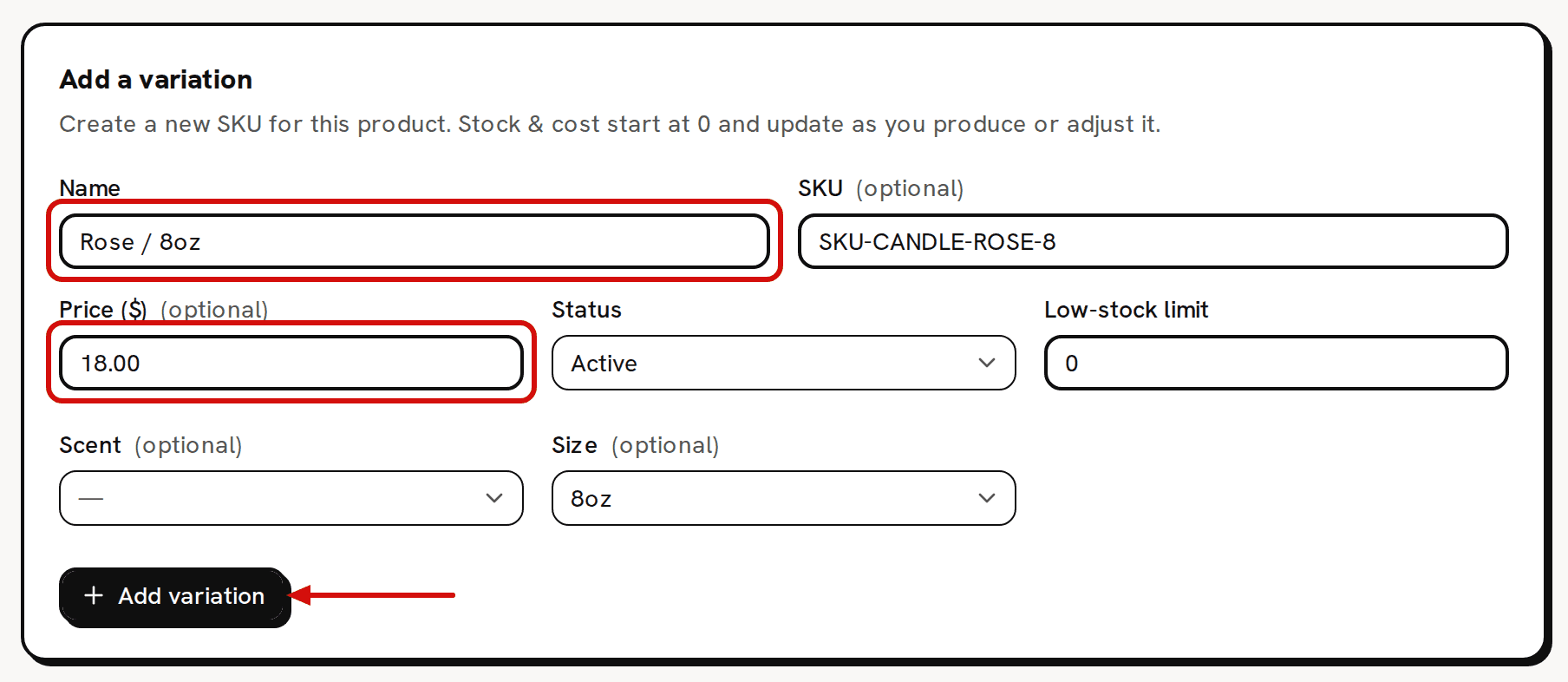
Stock and cost start at 0 and change as you make or adjust stock. Click Add variation. 'Variation added' confirms it, the form clears, and the new row appears in the Variations table.
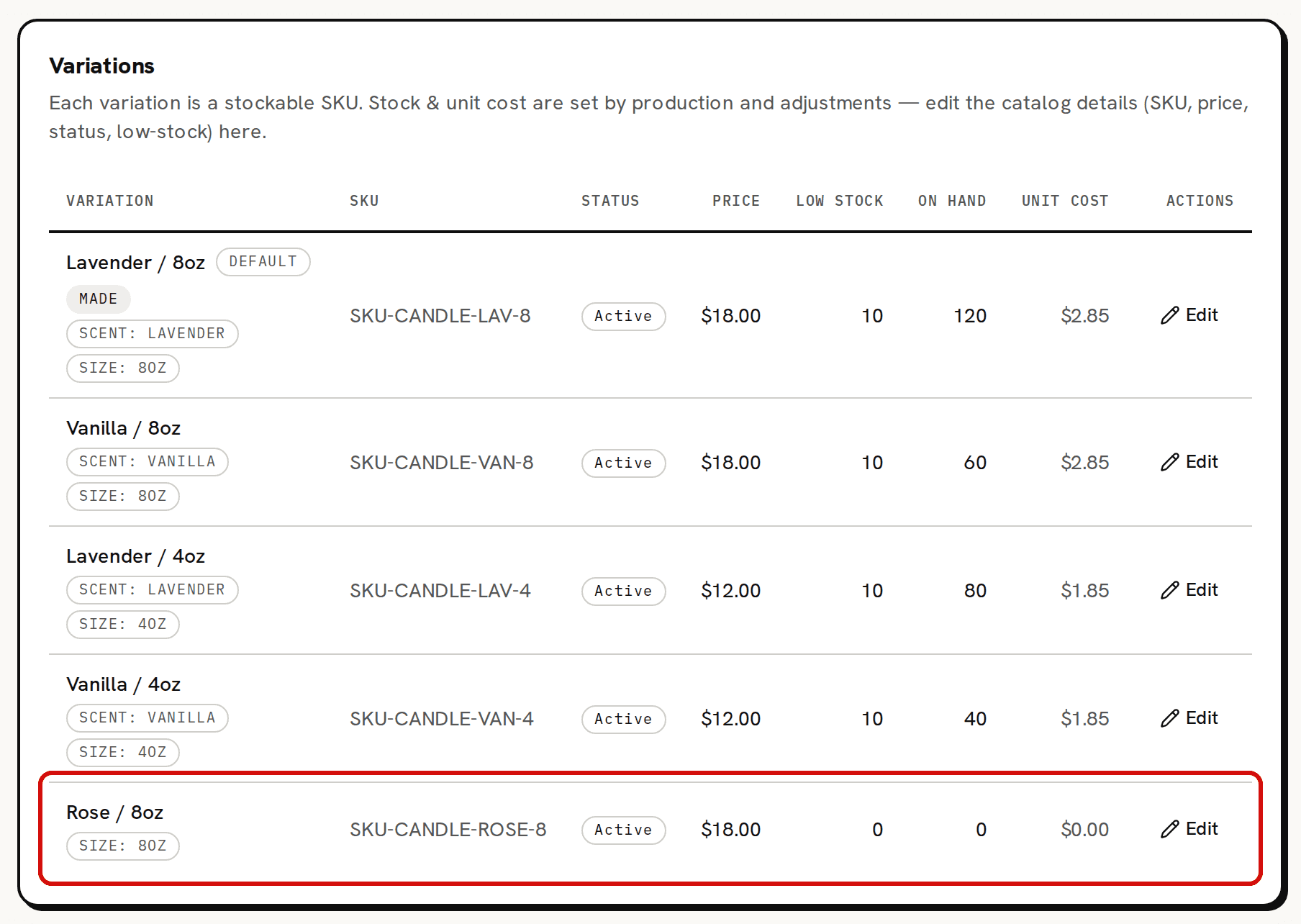
The new variation sits beside the others with 0 on hand and a $0.00 unit cost.
What starts at zero
The new variation joins the Variations table with 0 on hand and a $0.00 unit cost, and a badge for each attribute value you picked. On the Pricing card it reads Bought-in, with a Full cost of $0.00.
You never type stock or unit cost. They change when stock comes in:
- A variation you make gets them from batches. That needs a recipe for the variation: click No recipe — build one on its row on Recipes. A new variation you add here stays Bought-in until then.
- A variation you buy in or already hold gets them from an adjustment on Inventory with a cost basis. Bring your real stock into Trackost shows how.
A Bought-in variation that sells before any stock with a cost comes in has no cost to use, so the sale is recorded at $0.00, with the warning 'Recorded with no cost'.
Each version of a product you make can have its own recipe. Build it from the variation's own row on Recipes.
Field reference
- Name: required. Fixed once the variation is added.
- SKU: optional, and no other variation can carry it unless that one is archived. You can change it later.
- Price ($): optional, only with money access. It's the list price that Pricing judges against the cost. Write it the way decimals are written in the language Trackost shows you: 18.00 in English. A member without money access doesn't see the field. A price sent from a page opened before their money access was turned off is refused with 'Setting a price requires money access.' The variation isn't added.
- Status: Active, Draft or Archived. Archived takes the variation off the Pricing page, the dashboard's stock lists and the product picker on a new order, and order lines no longer match it by SKU.
- Low-stock limit: a whole number, 0 by default. It is saved and shown, and nothing else uses it.
- One picker for each of the product's attributes. A dash means no value.
Change it later
Click Edit on the variation's row in the Variations table. The row's SKU, Status, Price and Low stock cells turn into fields. Change them, then click Save, or Cancel to leave the row as it was. 'Variation updated' confirms the save. A member without money access has no Price column there, and their save keeps the price as it was. A price sent from a page opened before their money access was turned off is refused with 'Setting a price requires money access.', even when it is unchanged. Nothing is saved. The name, the attribute values, the stock on hand and the unit cost can't be edited there. With money access, clearing the price leaves the variation unpriced. A new SKU, or setting an archived variation back to Active or Draft, is refused when another variation that isn't archived already carries that SKU. A save also matches any order line that was waiting for the SKU.
Troubleshooting
- 'Name is required': the name is only spaces. An empty name is stopped by your browser before anything is sent.
- 'Another product already uses the SKU "SKU-CANDLE-ROSE-8". Give each product its own SKU so orders match automatically.': another variation that isn't archived, on this product or another, carries that SKU. Nothing is saved. Type another SKU, or leave it empty.
- 'Enter a valid price (e.g. 12.00)': the price isn't an amount Trackost can read. In English, 12,50 is refused and 12.50 works. More than two decimals, such as 1.234, is refused too.